June 4, 2026 · Matteo
How to Optimize SEO on Shopify (4-Week Plan)
How to optimize SEO on Shopify works best as a repeating cycle, not a one-afternoon task. This post is a 4-week action plan only.
For the full reference (checklists, image SEO depth, on-page basics), read the hub: how to optimize a Shopify store for SEO.
Before you start
Pick one primary metric: organic sessions, Image Search clicks, or revenue from organic. Run a baseline in Google Search Console if you have not already.
Week 1: Get indexed and measure
Goal: Google can crawl your store and you have a speed baseline.
- Verify your domain in Search Console and submit
sitemap.xml. - URL-inspect your homepage and top product. Request indexing if needed.
- Run PageSpeed Insights (mobile) on homepage, best collection, best seller.
Step-by-step indexing: how to add your Shopify store to Google.
Done when: Search Console shows pages indexed and you saved PageSpeed scores.
Week 2: Fix your top 20 products
Goal: Highest-revenue URLs have clean on-page SEO.
For your top 20 products by sales:
- Unique title and meta description (Search engine listing).
- Alt text on every gallery image in Products → Media.
- Descriptive filenames on re-upload (not
IMG_xxxx.jpg). - Readable URL handle (
/products/blue-linen-shirt).
Do not boil the ocean. Twenty strong product pages beat two hundred thin ones.
Image size targets if you re-upload: Shopify image size guidelines.
Done when: All top 20 products pass a manual spot check in admin.
Week 3: Scale catalog image SEO
Goal: Fix alt text and file format beyond your top sellers.
Manual edits fade after ~50 SKUs. Options:
- DIY: Block time, same steps as Week 2, batch by collection.
- Pixly: Store Audit (Growth/Scale) → queue flagged products → Review → sync. Tutorial: how to use Pixly.
After a scan, flagged products appear in the Store Audit list on the Auto-Pilot page:
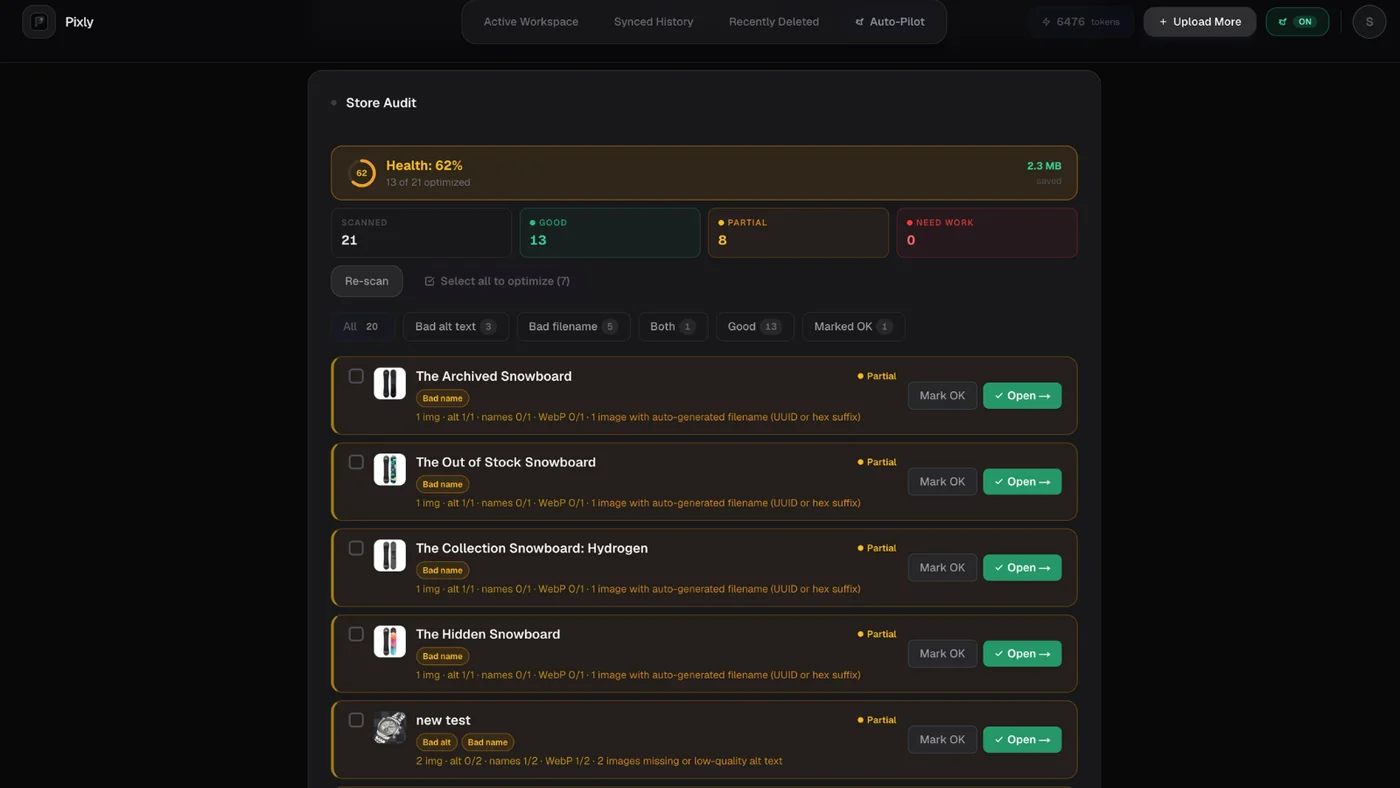
Pilot 10 products, preview the storefront, then expand.
Done when: Store Audit (or your spreadsheet) shows no missing alt text on best sellers and hero collections.
Week 4: Speed, apps, and one content piece
Goal: Remove non-content bottlenecks and publish one helpful page.
- Remove unused Shopify apps (script weight).
- Compress homepage banner assets in the theme editor.
- Publish one blog post or FAQ that answers a real buyer question. Link to a collection.
- Re-run PageSpeed on the same URLs from Week 1.
Speed playbook: how to optimize Shopify store speed.
Done when: Mobile PageSpeed on your best seller is flat or improved and one new content URL is live.
Repeat monthly
- Check Search Console Performance for page-2 queries worth optimizing.
- Add alt text to new products before launch.
- Refresh seasonal collection meta descriptions.
- Revisit tools once a year: best Shopify image optimization tools 2026.
Got questions?
Frequently asked
Bottom line
How to optimize SEO on Shopify: four weeks, four focuses (index, top products, catalog images, speed + content). Use the store SEO hub when you need the full picture.
Install Pixly on Shopify · Features · Blog
Written by Matteo, founder of Pixly. Questions? hello@getpixly.app
Pixly for Shopify
Bulk alt text, WebP, and 1:1 crops synced to Shopify
Review every image before sync. Start free with 69 tokens per month. No credit card needed.
More from Pixly
- How Pixly works — upload, AI analysis, review, Shopify sync
- Features — Store Audit, Auto-Pilot, WebP, alt text
- Pricing — start free with 69 tokens per month
- How to Optimize Shopify Store for SEO (2026 Guide)
- How to Add Your Shopify Store to Google (2026 Guide)
- How to Use Pixly on Shopify (2026 Guide)