June 7, 2026 · Matteo
Best Shopify Image Optimization Tools (2026 Guide)
The best Shopify image optimization tools in 2026 depend on what you actually need: compression only, alt text only, background removal, or a full catalog pipeline with review before sync.
I built Pixly for merchants who want AI alt text, WebP, square crop, and Shopify sync in one review-first workflow. This guide compares Pixly honestly against other options so you pick the right fit.
Quick comparison
| Tool | Best for | Alt text AI | WebP / compress | Square crop | Shopify sync | Review before live |
|---|---|---|---|---|---|---|
| Pixly | Catalog image SEO pipeline | Yes (Gemini) | Yes (default WebP) | Yes (1:1 center) | Yes | Yes |
| TinyIMG | Automatic compression | Limited | Yes | No | Yes | Mostly automatic |
| Crush.pics | Bulk compress | No | Yes | No | Yes | Limited |
| SEO Image Alt Text apps | Alt text only | Some | No | No | Yes | Varies |
| Photoroom | Photo editing / backgrounds | No | Export | Manual | Manual export | N/A |
| Squoosh / Photoshop | One-off manual edits | No | Manual | Manual | Manual upload | You |
Prices and features change. Verify on each app's Shopify listing before you buy.
Pixly (our pick for catalog image SEO)
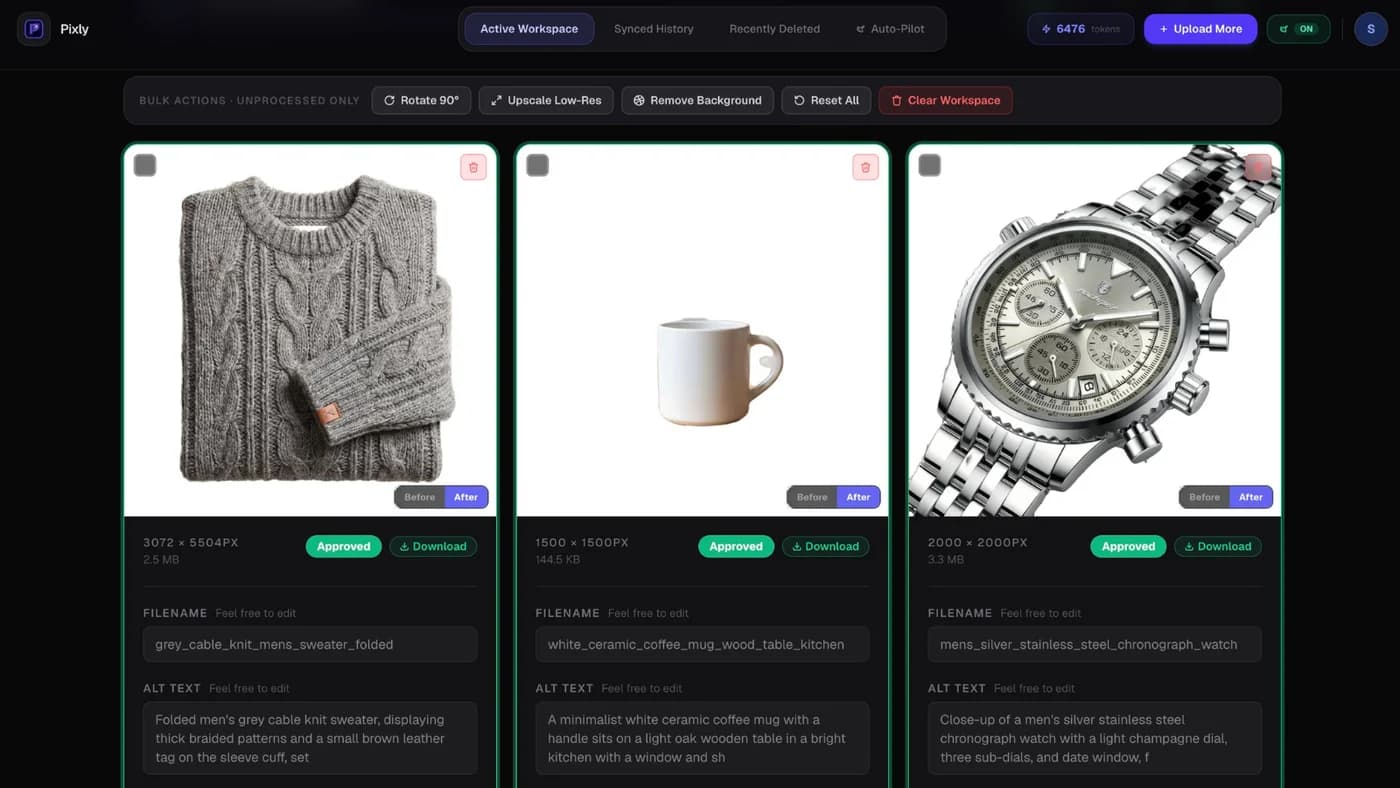
Best for: Merchants who want AI alt text, SEO filenames, WebP, 1:1 square crop, and sync back to Shopify after reviewing every image.
Strengths:
- Reads the photo and writes natural alt text (not templates)
- WebP on by default, toggled per image in Review
- Store Audit for catalog-wide gaps (Growth/Scale)
- Auto-Pilot for new products (Growth/Scale)
- 14-day Recently Deleted recovery
Tradeoffs:
- Not a theme banner editor
- Token-based pricing (free tier to test)
- Review step adds time vs fully automatic compression apps (by design)
The Review screen is where you approve filename, alt text, WebP, and crop before sync:
Install Pixly · How to use Pixly · Pricing
TinyIMG (Shopify App Store)
Best for: Hands-off automatic compression and lazy load features with minimal setup.
Strengths: Set-and-forget compression, popular on Shopify, good for merchants who mainly want smaller files.
Tradeoffs: Less focus on AI alt text quality and filename SEO. Less control per image than a review-first app. No dedicated square crop pipeline for grid consistency.
Choose TinyIMG if: You already have alt text handled and mainly need automatic shrink-on-upload.
Website: search "TinyIMG" on the Shopify App Store.
Crush.pics (Shopify App Store)
Best for: Bulk image compression and optimization rules applied broadly.
Strengths: Established Shopify image optimizer, batch processing, automation options.
Tradeoffs: Not built around AI-generated alt text from photo content. You may still edit metadata separately.
Choose Crush.pics if: Compression automation matters more than AI alt text and rename workflows.
Dedicated alt text apps (e.g. Alt Text Manager, SEO alt text apps)
Best for: Merchants whose only gap is alt text, not file size or format.
Strengths: Focused feature, sometimes bulk alt text templates or AI assist.
Tradeoffs: Often template-based AI, not full visual understanding. Rarely handle WebP conversion and square crop in the same pass.
Choose an alt text app if: File size is fine and you only need metadata fixes. Compare whether AI reads the image or fills templates.
Photoroom
Best for: Background removal, lifestyle edits, and marketing creatives outside Shopify admin.
Strengths: Strong editing tools, popular for cutouts and scenes.
Tradeoffs: Not a native Shopify sync pipeline for catalog metadata. You export and upload manually unless you use separate integrations.
Choose Photoroom if: You need photo editing, not catalog-wide SEO sync.
Website: photoroom.com
Manual tools (free or desktop)
Squoosh (squoosh.app): Free browser compressor. Great for one image, not 2,000 SKUs.
Photoshop / Canva: Full control, zero automation. Best for brands with a designer and tiny catalogs.
Choose manual if: You have under ~20 products and time to spare.
Shopify image optimiser (what merchants mean)
Shopify image optimiser searches usually mean any app or workflow that compresses, converts, or renames product media. There is no single feature called "image optimiser" in core Shopify admin.
| Optimiser goal | Typical tool type |
|---|---|
| Smaller file size | TinyIMG, Crush.pics, Pixly WebP |
| Alt text + filenames | Pixly, dedicated alt apps |
| Square crop + grid consistency | Pixly |
| Theme banner compression | Theme editor + manual export |
If you need compression only, compare TinyIMG and Crush.pics above. If you need alt text, WebP, crop, and sync with review, Pixly matches the full optimiser stack merchants describe in forums.
Related: convert all images to WebP · store speed guide.
How to choose in 2026
- Catalog size: Under 20 products → manual may work. Hundreds+ → automation required.
- Biggest gap: Speed only → compression app. Alt text + SEO → Pixly or dedicated alt tool. Editing creatives → Photoroom.
- Control: Want to approve every image before live → Pixly Review workflow.
- Budget: Start with free tiers (Pixly 69 tokens/month, TinyIMG/Crush trials if offered).
Got questions?
Frequently asked
Bottom line
The best Shopify image optimization tools in 2026 split into compression apps, alt text apps, editors, and full pipelines. Pixly fits merchants who want catalog image SEO end to end with review before anything goes live.
Try multiple tools on the same 10-product pilot. Compare alt text quality, file size, and how much manual cleanup each saves.
Install Pixly on Shopify · Compare size specs · FAQ
Written by Matteo, founder of Pixly. Questions? hello@getpixly.app
Pixly for Shopify
Bulk alt text, WebP, and 1:1 crops synced to Shopify
Review every image before sync. Start free with 69 tokens per month. No credit card needed.
More from Pixly
- How Pixly works — upload, AI analysis, review, Shopify sync
- Features — Store Audit, Auto-Pilot, WebP, alt text
- Pricing — start free with 69 tokens per month
- How to Use Pixly on Shopify (2026 Guide)
- Shopify image size guidelines (2026 Guide)
- How to Optimize Shopify Store Speed (2026 Guide)
- Shopify Convert All Images to WebP (2026 Guide)